Cab Booking Portal Software: Features & Launch Guide for Taxi Operators (2026)
Explore how a cab booking portal works, from One Way, Round Trip, Local and Airport search to fare management, driver assignment, customer accounts, payments and booking notifications.
What is a cab booking portal?
A cab booking portal is a website and operations system that helps taxi operators, travel agencies and fleet businesses accept trip requests, show suitable vehicles, manage fares and coordinate journeys. Customers use the website to select a route, date and cab category; staff use an admin panel to review the request, confirm the commercial details and assign a vehicle and driver.
Unlike a basic enquiry form, a connected cab booking system keeps the search, booking reference, customer account, assigned driver, fare record and payment status together. This reduces manual re-entry and makes it easier for the team to respond consistently whether the customer books online or an administrator creates the booking.
Why taxi operators need an online booking website
Phone calls and chat enquiries are useful, but they do not automatically provide a structured record of pickup, destination, date, preferred cab, fare and payment status. When staff copy details into spreadsheets or WhatsApp conversations, important information can become difficult to find during busy travel periods.
An online cab booking website gives customers a clear, mobile-friendly place to plan a trip. The admin team can see pending requests in one queue, follow up quickly, and manage the journey from initial enquiry to completion without relying on scattered messages.
- Accept bookings outside office hours
- Capture consistent pickup, drop, date and contact details
- Offer different vehicle categories on one website
- Reduce manual follow-ups with booking status records
- Give returning customers access to their booking history
Four essential trip types: One Way, Round Trip, Local and Airport
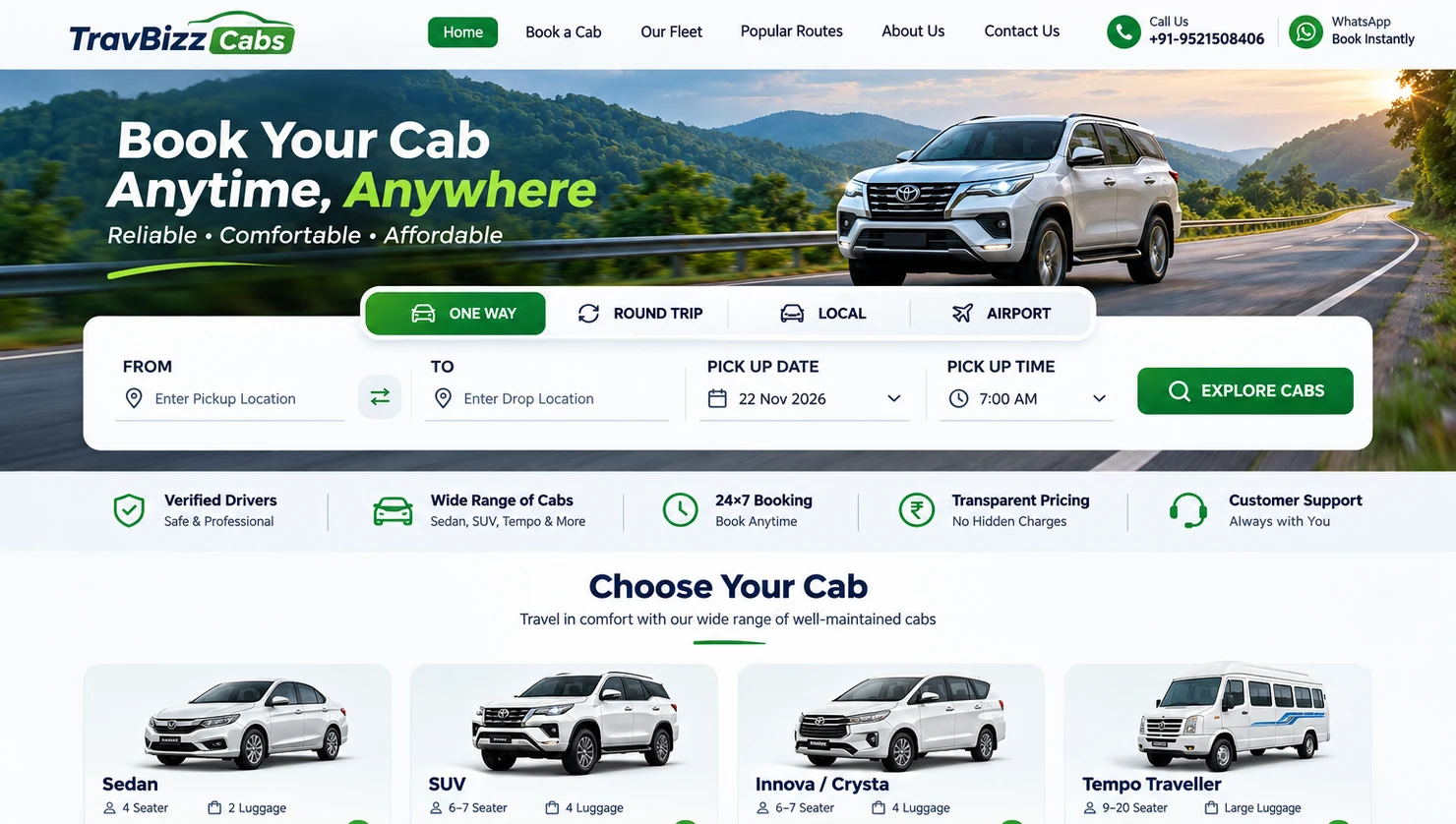
One Way is designed for travel from one location to another, such as Delhi to Agra. A good search flow captures the departure date, time, pickup and drop locations, then uses the configured fare logic to show relevant cab choices.
Round Trip adds the return date and the pricing requirements for a multi-day or return journey. Local trips typically use packages such as 4 hours / 40 km or 8 hours / 80 km, with extra hours and kilometres defined by the operator. Airport transfers may require pickup or drop-specific fares and clear flight or terminal instructions.
All four trip types should use the same customer experience while letting the admin set their own rules. The customer should not need to understand the operator's internal fare calculations to find an appropriate cab.
Google-powered locations and a useful cab search experience
Pickup and destination inputs are easier to use when they suggest recognised locations rather than accepting only arbitrary text. A Google Maps integration can provide place suggestions, route distance and estimated travel duration, subject to the APIs, configuration and billing enabled for the operator.
A professional results page should keep the selected route visible and let travellers compare cabs using filters for category, model, fuel type, air conditioning, seating and price. Each result should show an image, key capacity details, a clearly presented fare where configured and a straightforward way to continue to booking.
Distance and travel time are estimates, not guaranteed journey conditions; traffic, route changes and stops can affect the actual trip. The booking process should display the operator's confirmed price and applicable extras clearly before payment is requested.
Flexible fare management for different routes and cab categories
Fare rules are one of the most important differences between a simple booking form and dedicated cab booking management software. A sedan may have a different base price and per-kilometre rate from an SUV or Tempo Traveller. Local packages may use fixed included hours and kilometres, while airport rides may have route-specific prices.
Operators should be able to manage base fare, per-kilometre charges, minimum kilometres, driver allowance, night charges, waiting, extra hours, tolls, parking, taxes and fixed routes from Admin. The exact pricing policy depends on the business, so the system should make these rules editable rather than hardcoded.
Before launching, test each trip type, category and route with representative bookings. In particular, verify that the fare shown in search matches the booking review and final invoice after authorised changes.
- Cab category and trip-type rate cards
- Local packages and fixed route pricing
- Included and extra kilometres/hours
- Toll, parking, waiting and driver allowance rules
- Coupons, discounts and optional add-ons
From cab selection to booking confirmation
After choosing a vehicle, the traveller should see a structured booking review: pickup and drop, trip date, vehicle category, estimated fare, included services, optional add-ons and passenger contact details. If coupons are supported, discounts should be validated by the server before the final amount is shown.
A guest should be able to submit a booking without creating an account first. The portal can then create or link a customer account using appropriate identity checks, send account access information and associate the booking with My Bookings. Avoid sending a generated password in plain text over WhatsApp or email; account activation and password setting are safer alternatives.
New website requests can enter Admin as Pending, with a unique booking reference and an event history. Staff can then review availability, approve the fare, assign a vehicle and move the booking through the appropriate status.
Booking management, driver assignment and daily operations
An operations dashboard should give staff a searchable view of Pending, Confirmed, Assigned, On Trip, Completed and Cancelled bookings. Booking records need the route, pickup time, customer contact, fare, payment position and any assigned cab or driver. An activity trail helps clarify who changed the status and when.
Fleet management includes individual cars, registration details, seats, luggage capacity, vehicle photos and availability. Driver management includes driver profiles, licence information, contact details, duty assignments and time-off blocks. Assignment checks can help prevent the same vehicle or driver from being scheduled for overlapping duties.
Once a duty is assigned, the driver can receive a trip summary through a configured WhatsApp integration. Customer communication may include the booking reference, booking status and assigned driver contact details when the operator is ready to share them.
WhatsApp, email and customer account workflows
Automatic communication is valuable when it is reliable and properly tracked. A connected system can prepare a booking acknowledgement, customer account welcome, driver assignment notification and booking status update. SMTP email may be used where the customer has provided an address, while WhatsApp requires a working sender session or approved messaging setup.
Sending a request to a messaging provider is not the same as confirmed delivery to a phone. The admin should record accepted, failed and delivery statuses when the provider supplies them, along with enough diagnostic detail to retry genuine failures safely. Message queues should also respect the configured provider rate limits and consent requirements.
A customer portal brings booking history, status, downloadable vouchers, invoices and profile management into one place. Mobile OTP or password login can be used when their respective services are correctly configured and verified.
Manual and partial payments, receipts and invoices
A practical cab booking portal can support payment tracking even before a card or UPI payment gateway is connected. The customer may choose to pay later or record an advance or full payment by an authorised manual method. The website can show UPI or bank payment instructions and let the customer submit transaction details and proof for review.
Uploading a screenshot does not prove that money was received. Admin should verify the transaction before recording the amount as Paid. Each booking should clearly show Total Fare, Verified Paid and Remaining Balance, including when the customer has made multiple part payments.
Print-friendly booking vouchers, invoices and receipts should use the same booking data across customer and admin views. Receipts should identify actual verified receipts, while invoices and balance statements should show outstanding amounts without incorrectly marking unpaid balances as collected.
Website content, coupons and reporting from one admin panel
A professional cab website needs more than a booking form. Operators should be able to update homepage banners, cab photos, popular route pages, descriptions, About Us, testimonials, contact information and legal pages without changing source code for every edit.
Coupons and add-ons can support seasonal offers and service options when rules, validity, usage limits and eligibility are controlled centrally. Reports can help monitor bookings, payment records, revenue, cab utilisation and customer demand. Staff accounts and permissions reduce the need to share the main administrator password.
A practical checklist before launching your cab booking portal
A polished design is only part of a successful launch. Test the booking journey as a real customer on desktop and mobile, then confirm that each submission appears in Admin and is linked to the right customer. Test existing account login, new account activation, password reset and OTP using the configured communication services.
Check one-way, round-trip, local and airport fares separately. Ensure that booking history, driver assignment, duplicate duty checks, invoice totals and payment balances remain correct after an admin changes booking status or verifies a part payment. Test WhatsApp and SMTP with real consenting recipients, review failure logs, and verify the exact sender configuration instead of relying only on a test button.
Before submitting the website to Google Search Console, publish useful original pages, maintain a valid XML sitemap and verify the canonical URLs. Search indexing can take time and is not guaranteed simply because a URL was submitted.
- Test all four trip types on mobile and desktop
- Verify fare calculations and coupon rules
- Check guest booking and customer account linking
- Confirm staff, driver and vehicle availability workflows
- Test SMTP and WhatsApp provider statuses on real devices
- Check voucher, invoice, receipt and part-payment totals
- Publish policies, contact details and an XML sitemap
Explore TravBizz Cab Booking Portal
TravBizz Cab Booking Portal combines a branded customer website with an admin workspace for booking operations, fare rules, cabs, drivers, customer accounts, manual payments, vouchers, invoices, notifications and website content management.
It is designed for taxi operators, fleet owners and travel businesses that want a connected booking workflow rather than separate spreadsheets and messaging conversations. If you are planning a customer-facing cab website or upgrading a manual booking operation, explore the product page and discuss the configuration you need with the TravBizz team.
Put these ideas into practice with TravBizz
Connect your sales, itinerary, operations and customer workflows with travel technology designed for agencies.
Frequently asked questions
What is cab booking portal software?
Cab booking portal software is a customer-facing booking website connected to admin tools for fares, fleet, bookings, customers, drivers and payment records.
Can a cab booking portal offer One Way, Round Trip, Local and Airport bookings?
Yes. These can be separate search modes with different inputs and fare rules, all managed through one admin system.
Does a taxi operator need a payment gateway to launch?
Not always. Operators can start with carefully verified manual payment records and invoices, then add an online gateway when required.
Can customers book without registering first?
A portal can accept a guest booking, create or reuse a customer account, and let the traveller securely activate the account or sign in to see bookings.
Can drivers and customers receive WhatsApp updates?
Yes, if a supported WhatsApp provider is configured, the recipients have appropriate consent, and message delivery and rate limits are handled correctly.
How are fares calculated for different cab categories?
Operators configure rate cards or packages by cab category and trip type, with optional base fares, per-kilometre pricing, minimums, extra hours, and other charges.